<div class="cs-rating pd-rating" id="pd_rating_holder_1819065_post_442"></div>
<h1>Introduction</h1>
<p>Oracle release the Webcenter Patchset 4 (PS4), version 11.1.15, recently and I am in the process of installing/testing this product. I am going to document my observations for future reference and hope it helps out others in the process.</p>
<p>Download files here: <a href="
http://www.oracle.com/technetwork/middleware/webcenter/downloads/index.html">http://www.oracle.com/technetwork/middleware/webcenter/downloads/index.html</a></p>
<p>Read Oracle’s Documentation here: <a href="
http://download.oracle.com/docs/cd/E21764_01/install.1111/b32474/start.htm#ASINS101">http://download.oracle.com/docs/cd/E21764_01/install.1111/b32474/start.htm#ASINS101</a></p>
<h1>The Process…</h1>
<p>The process is quite simple, I download Installers from Oracle’s Middleware/Webcenter site, selected the appropriate version and ran them on Oracle Enterprise Linux (OEL) version 6.0 … the OEL version here is the important part because there were a few issues related to the PS4 installers and OEL v6.</p>
<p>Anyways, here is what I downloaded</p>
<ul>
<li><del>wls1035_linux32.bin</del> – Oracle WebLogic Server 11g R1 (10.3.5)</li>
<ul>
<li>Update: I should not used this. Turns out I was given a 64bit JVM and the “rcu exception in thread “main” java.lang.unsatisfiedlinkerror” is the symptom for it</li>
<ul>
<li>Solution: Goto oracle.com and download the <a href="
http://download.oracle.com/otn/nt/middleware/11g/wls/1035/wls1035_generic.jar">64bit Weblogic 10.1.3.5 jar</a> and then separately <a href="
http://download.oracle.com/otn-pub/java/jdk/6u25-b06/jdk-6u25-linux-x64.bin">download the 64bit jdk</a></li>
</ul>
</ul>
<li>ofm_rcu_linux_11.1.1.5.0_disk1_1of1.zip – 11.1.1.5 RCU (I got the 32 bit one first and then the 64 bit one and both were named the same)</li>
<li>ofm_wc_generic_11.1.1.5.0_disk1_1of1.zip – Generic Oracle WebCenter Release 11g R1 (11.1.1.5.0)</li>
</ul>
<p>I have a virtual machine, as mentioned earlier… VM: OEL 6</p>
<p>And another VM with the database … DB: Oracle 11g</p>
<h1>Before you start….</h1>
<p>Check you Linux install has the right libraries (see <strong>Appendix-A</strong>). There seems to be an issue with the X11 libraries and the RCU installer. Do a “rpm -qa” and grep for “X11”<br />
make sure you have the i386 libaries or else you will see the following error (“blah blah libXext.so.6 is missing”)</p>
<pre>Failed to initialize logger with location :/home/oracle/tmp/rcuHome/rcu/log/logdir.2011-05-26_00-01/rcu.log
Initializing logger using the following location :/tmp/logdir.2011-05-26_00-01/rcu.log
Exception in thread "main" java.lang.UnsatisfiedLinkError: /home/oracle/tmp/rcuHome/jdk/jre/lib/i386/xawt/libmawt.so: libXext.so.6: cannot open shared object file: No such file or directory
at java.lang.ClassLoader$NativeLibrary.load(Native Method)</pre>
<p>This issue was fixed by going back to the DVD installer and selecting additional libraries for the 64bit OEL 6 install.</p>
<p>Finally once you have the right library, if you do not have your X11 stuff setup you will get the following errors:</p>
<pre>[oracle@pdemora140rhv bin]$ ./rcu
Failed to initialize logger with location :/home/oracle/tmp/rcuHome/rcu/log/logdir.2011-05-26_22-07/rcu.log
Initializing logger using the following location :/tmp/logdir.2011-05-26_22-07/rcu.log
Exception in thread "main" java.lang.InternalError: Can't connect to X11 window server using 'xx.xx.xx.xxx:0' as the value of the DISPLAY variable.
at sun.awt.X11GraphicsEnvironment.initDisplay(Native Method)</pre>
<h3><strong>Setup your DISPLAY in the following manner</strong></h3>
<ul>
<li>Get an XServer, Install and Run it . Example: Get <em><strong>XMING</strong></em></li>
<p>(See Related Blog Post Here: )</p>
</ul>
<ul>
<li>Goto your <em><strong>“rcuHome/bin</strong></em>” and do “<em><strong>./rcu</strong></em>“</li>
</ul>
<h1>Running the installers ….</h1>
<p><span style="text-decoration:underline;">Download</span>: So earlier we downloaded the following</p>
<p><em>wls1035_linux32.bin</em> – Oracle WebLogic Server 11g R1 (10.3.5)<br />
<em>ofm_rcu_linux_11.1.1.5.0_disk1_1of1.zip</em> – 11.1.1.5 RCU (I got the 32 bit one first and then the 64 bit one and both were named the same)<br />
<em>ofm_wc_generic_11.1.1.5.0_disk1_1of1.zip</em> – Generic Oracle WebCenter Release 11g R1 (11.1.1.5.0)</p>
<p>Now we can begin moving, extracting and installing. Start with the <em>Weblogic Server</em>, then run the <em>RCU</em> tool and finally install <em>Webcenter</em>.</p>
<ol>
<ol>
<ol>
<li> <span style="text-decoration:underline;">SCP</span>: Move the downloaded files to your VM using SCP (I put them under /home/oracle/tmp) and unzip (simply use “unzip filename.zip”)</li>
<li><span style="text-decoration:underline;">Change Permissions</span>: Make the WLS Installer Executable <strong><em>chmod +x wls1035_linux32.bin</em></strong></li>
<li><span style="text-decoration:underline;">Run:</span> the installer “./wls1035_linux32.bin”</li>
<li><span style="text-decoration:underline;">Check</span>: This should create the weblogic home with the following structure</li>
</ol>
</ol>
</ol>
<pre style="padding-left:120px;"> drwxr-x---. 6 oracle oracle 4096 May 25 21:13 coherence_3.6
drwxr-x---. 9 oracle oracle 4096 May 25 21:13 wlserver_10.3
drwxr-x---. 9 oracle oracle 4096 May 25 21:13 .
drwxr-x---. 2 oracle oracle 4096 May 25 21:13 logs
-rw-r-----. 1 oracle oracle 32 May 25 21:13 .home
-rw-r-----. 1 oracle oracle 2627 May 25 21:13 registry.xml
-rw-r-----. 1 oracle oracle 87384 May 25 21:13 registry.dat
-rw-r-----. 1 oracle oracle 623 May 25 21:13 ocm.rsp
drwxr-x---. 7 oracle oracle 4096 May 25 21:12 jrockit_160_24_D1.1.2-4
drwxr-x---. 7 oracle oracle 4096 May 25 21:12 jdk160_24
drwxr-x---. 8 oracle oracle 4096 May 25 21:11 utils
-rw-rw----. 1 oracle oracle 133 May 25 21:09 domain-registry.xml
drwxr-x---. 7 oracle oracle 32768 May 25 21:08 modules
drwxrwxr-x. 3 oracle oracle 4096 May 25 20:21 ..</pre>
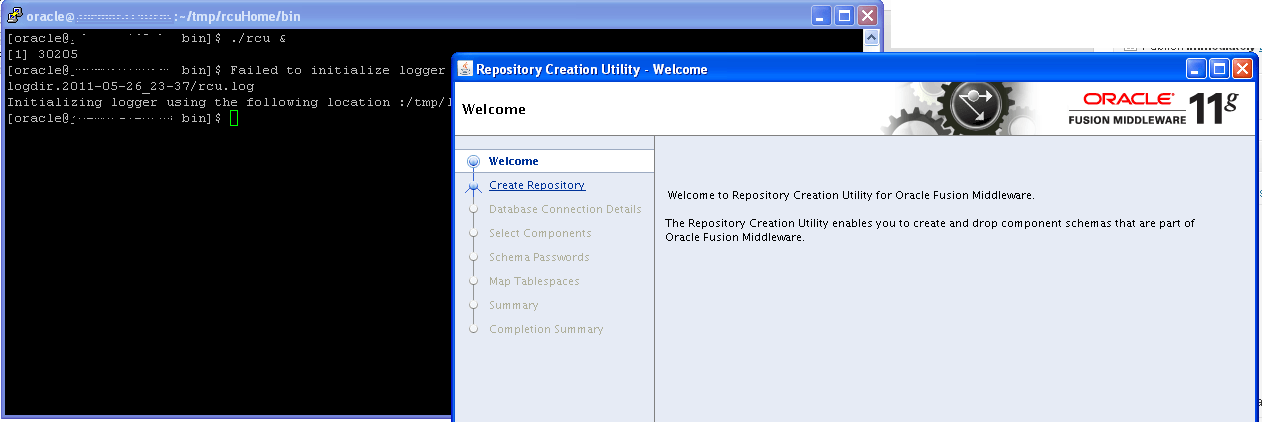
<h1>Install the Webcenter/UCM schemas using the RCU tool….</h1>
<p style="text-align:center;"><a href="
http://alok-mishra.com/wp-content/uploads/2011/05/rcu_ok.png"><img class="size-full wp-image-445" title="rcu_ok" src="
http://alok-mishra.com/wp-content/uploads/2011/05/rcu_ok.png" alt="" width="497" height="166" /></a></p>
<h2 style="text-align:left;">RCU – Screen 2 :</h2>
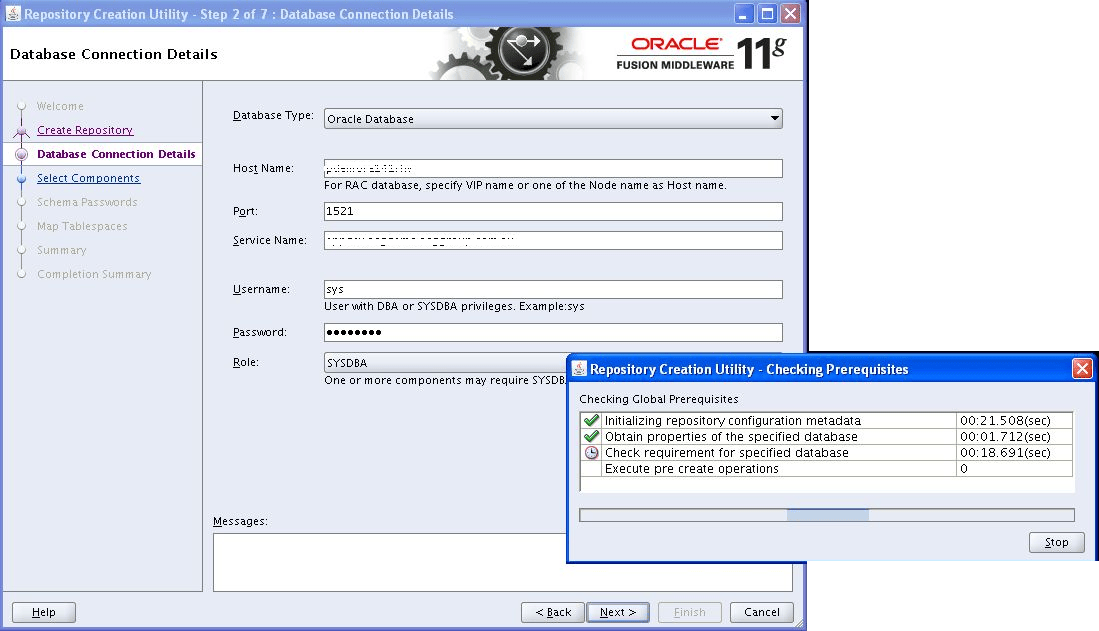
<p style="text-align:left;">Error with bad service name: If you don’t know your service name, go to you DB server and do “tnsping”. For example, my DBA created the schema with a SID of “appdev” but a “tnsping appdev” revealed that the SID was different</p>
<p style="text-align:left;">[oracle@myhost~]$ tnsping appdev</p>
<p>TNS Ping Utility for Linux: Version 11.2.0.1.0 – Production on 26-MAY-2011 15:55:44</p>
<p>Copyright (c) 1997, 2009, Oracle. All rights reserved.</p>
<p>Used parameter files:<br />
/data/Oracle/app/oracle/product/11.2.0/dbhome_1/network/admin/sqlnet.ora</p>
<p>Used TNSNAMES adapter to resolve the alias<br />
Attempting to contact (DESCRIPTION = (ADDRESS = (PROTOCOL = TCP)(HOST = myhost.env.company.com. au)(PORT = 1521)) (CONNECT_DATA = (SERVER = DEDICATED) (SERVICE_NAME = appdev.env.company.com.au)))<br />
OK (0 msec)</p>
<p style="text-align:left;"><a href="
http://alok-mishra.com/wp-content/uploads/2011/05/rcu_2.png"><img class="aligncenter size-full wp-image-450" title="RCU - Screen 2" src="
http://alok-mishra.com/wp-content/uploads/2011/05/rcu_2.png" alt="" width="497" height="285" /></a></p>
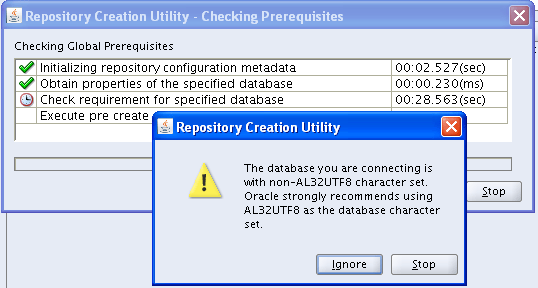
<p style="text-align:left;">Ignoring the “non-AL32UTF8” error</p>
<h2 style="text-align:left;"><a href="
http://alok-mishra.com/wp-content/uploads/2011/05/rcu_2-1.png"><img class="aligncenter size-full wp-image-451" title="Ignore the "non-AL32UTF" error" src="
http://alok-mishra.com/wp-content/uploads/2011/05/rcu_2-1.png" alt="" width="497" height="266" /></a><br />
RCU – Screen 3</h2>
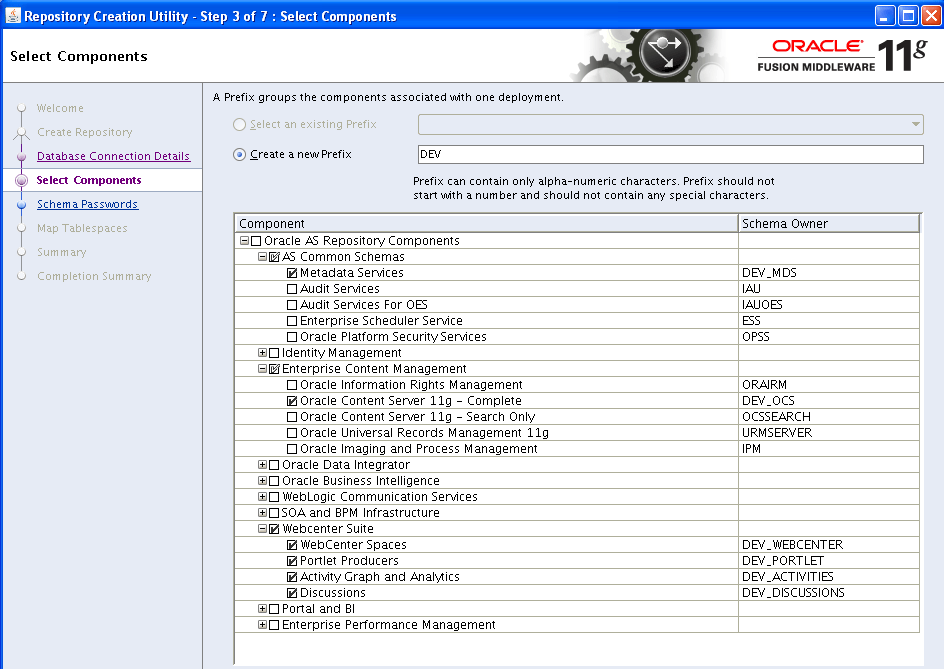
<p style="text-align:left;">Select the Schemas to install – OCS and Webcenter</p>
<p style="text-align:left;"><a href="
http://alok-mishra.com/wp-content/uploads/2011/05/rcu_3.png"><img class="aligncenter size-full wp-image-452" title="Select the Schemas to install" src="
http://alok-mishra.com/wp-content/uploads/2011/05/rcu_3.png" alt="" width="497" height="352" /></a></p>
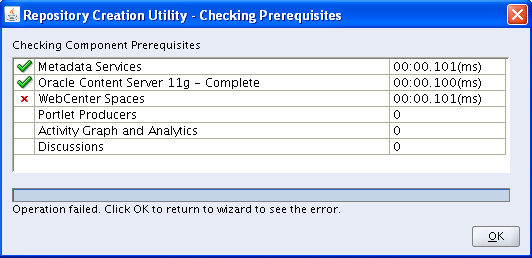
<p>Error with Webcenter – “PROCESSES” is too low</p>
<p><a href="
http://alok-mishra.com/wp-content/uploads/2011/05/rcu_3-_err1.png"><img class="aligncenter size-full wp-image-453" title="Error with low processes" src="
http://alok-mishra.com/wp-content/uploads/2011/05/rcu_3-_err1.png" alt="" width="497" height="241" /></a></p>
<p><a href="
http://alok-mishra.com/wp-content/uploads/2011/05/rcu_3-_err2.png"><img class="aligncenter size-full wp-image-454" title="Processes too low" src="
http://alok-mishra.com/wp-content/uploads/2011/05/rcu_3-_err2.png" alt="" width="497" height="57" /></a></p>
<pre style="text-align:left;">-------------------------------------------------------------------------------------------------------------
ERROR In RCU Tool:
-------------------------------------------------------------------------------------------------------------
RCU-6083:Failed - Check prerequisites requirement for selected component:WEBCENTER
Please refer to RCU log at /tmp/logdir.2011-05-26_23-37/rcu.log for details.
Error: Oracle Initialization Parameter 'PROCESSES' is too low.
Cause: The Oracle Initialization Parameter 'PROCESSES' must be at least 200.
Action: Change the Database Initialization Parameter 'PROCESSES' to 200 or more, then rerun RCU.
RCU-6092:Component Selection validation failed. Please refer to log at /tmp/logdir.2011-05-26_23-37/rcu.log for details.
-------------------------------------------------------------------------------------------------------------
Fix:
-------------------------------------------------------------------------------------------------------------
SSH: <to my DB server>
Details: Fix the too low processes
From:
http://learnersreference.com/rcu-6083failed-check-prerequisites-requirement-for-selected-componentwebcenter-please-refer-to-rcu-log/
--------------------------------------------------------------------------------------------------------------
[oracle@xxxxxx~]$ sqlplus system/xxxxxx@appdev
SQL*Plus: Release 11.2.0.1.0 Production on Thu May 26 16:06:45 2011
Copyright (c) 1982, 2009, Oracle. All rights reserved.
Connected to:
Oracle Database 11g Enterprise Edition Release 11.2.0.1.0 - 64bit Production
With the Partitioning, OLAP, Data Mining and Real Application Testing options
SQL> show parameter processes
NAME TYPE VALUE
------------------------------------ ----------- ------------------------------
aq_tm_processes integer 0
db_writer_processes integer 1
gcs_server_processes integer 0
global_txn_processes integer 1
job_queue_processes integer 1000
log_archive_max_processes integer 4
processes integer 150
SQL> alter system set processes=500 scope=both;
alter system set processes=500 scope=both
*
ERROR at line 1:
ORA-02095: specified initialization parameter cannot be modified
SQL> show parameter processes
NAME TYPE VALUE
------------------------------------ ----------- ------------------------------
aq_tm_processes integer 0
db_writer_processes integer 1
gcs_server_processes integer 0
global_txn_processes integer 1
job_queue_processes integer 1000
log_archive_max_processes integer 4
processes integer 150
SQL> alter system set processes=500 scope=spfile;
System altered.
SQL> shutdown immediate;
Database closed.
Database dismounted.
ORACLE instance shut down.
SQL> SQL> SQL>
SQL>
SQL>
SQL> startup</pre>
<h2 style="text-align:left;">RCU – Screen 4</h2>
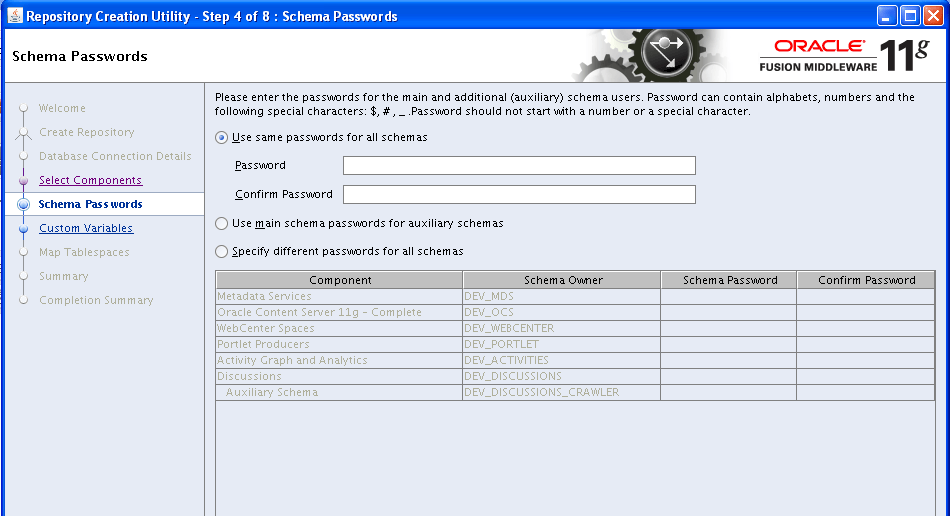
<p>Select the schema password, I chose to keep the same password for all schemas</p>
<p><a href="
http://alok-mishra.com/wp-content/uploads/2011/05/rcu_4.png"><img class="aligncenter size-full wp-image-456" title="Schema password" src="
http://alok-mishra.com/wp-content/uploads/2011/05/rcu_4.png" alt="" width="497" height="269" /></a></p>
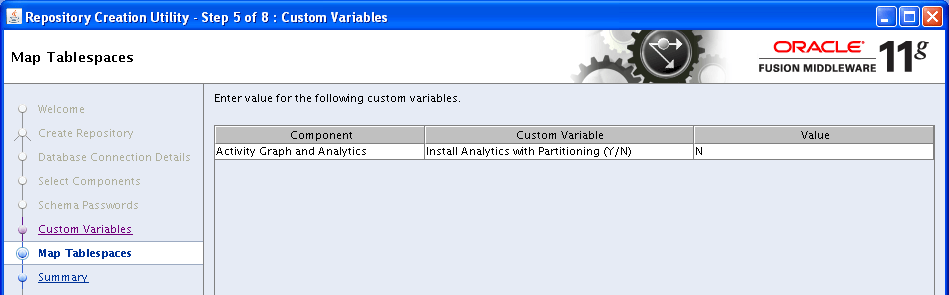
<h2>RCU – Screen 5</h2>
<p><a href="
http://alok-mishra.com/wp-content/uploads/2011/05/rcu_5.png"><img class="aligncenter size-full wp-image-455" title="rcu_5" src="
http://alok-mishra.com/wp-content/uploads/2011/05/rcu_5.png" alt="" width="497" height="154" /></a></p>
<h2>RCU – Screen 6</h2>
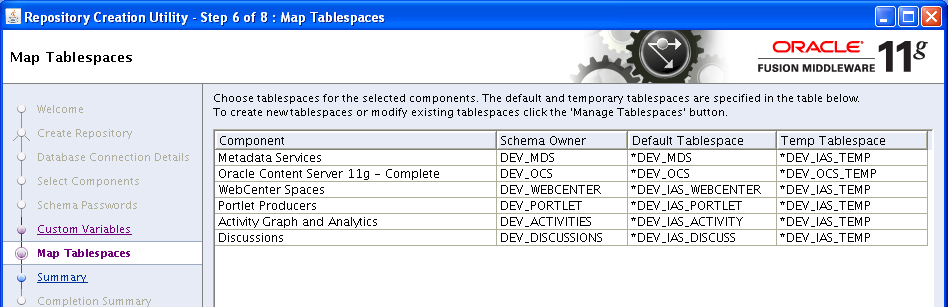
<p>Tables for the PS4 schema</p>
<p><a href="
http://alok-mishra.com/wp-content/uploads/2011/05/rcu_6.png"><img class="aligncenter size-full wp-image-459" title="PS4 Webcenter/UCM Schemas" src="
http://alok-mishra.com/wp-content/uploads/2011/05/rcu_6.png" alt="" width="497" height="160" /></a></p>
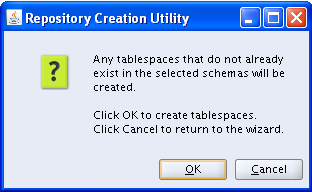
<p>Create Tablespaces – OK/CANCEL Dialog. Select “OK”</p>
<p><a href="
http://alok-mishra.com/wp-content/uploads/2011/05/rcu_6-1.png"><img class="aligncenter size-full wp-image-457" title="Click OK" src="
http://alok-mishra.com/wp-content/uploads/2011/05/rcu_6-1.png" alt="" width="312" height="192" /></a></p>
<p><a href="
http://alok-mishra.com/wp-content/uploads/2011/05/rcu_6-21.png"><img class="aligncenter size-full wp-image-460" title="Tablespaces created" src="
http://alok-mishra.com/wp-content/uploads/2011/05/rcu_6-21.png" alt="" width="497" height="182" /></a></p>
<h2>RCU – Screen 7</h2>
<p><a href="
http://alok-mishra.com/wp-content/uploads/2011/05/rcu_71.png"><img class="aligncenter size-full wp-image-462" title="Schemas" src="
http://alok-mishra.com/wp-content/uploads/2011/05/rcu_71.png" alt="" width="497" height="336" /></a></p>
<h2>RCU – Screen 8</h2>
<p>Completion Summary</p>
<p><a href="
http://alok-mishra.com/wp-content/uploads/2011/05/rcu_8.png"><img class="aligncenter size-full wp-image-463" title="Completion Summary" src="
http://alok-mishra.com/wp-content/uploads/2011/05/rcu_8.png" alt="" width="497" height="198" /></a></p>
<h1 style="text-align:left;">Appendix – A: OEL Libraries for X11</h1>
<pre>[oracle@pdemora140rhv Packages]$ rpm -qa|grep -y x11
xorg-x11-drv-ati-firmware-6.13.0-6.el6.noarch
xorg-x11-server-common-1.7.7-26.el6.x86_64
xorg-x11-drv-void-1.3.0-4.el6.x86_64
xorg-x11-drv-intel-2.11.0-7.el6.x86_64
xorg-x11-drv-sis-0.10.2-1.1.el6.x86_64
xorg-x11-drv-s3virge-1.10.4-1.1.el6.x86_64
xorg-x11-drv-vmware-10.16.7-2.1.el6.x86_64
xorg-x11-drv-openchrome-0.2.904-1.el6.x86_64
xorg-x11-drv-mga-1.4.12-2.el6.x86_64
xorg-x11-drv-sisusb-0.9.3-1.1.el6.x86_64
xorg-x11-drv-penmount-1.4.0-5.el6.x86_64
xorg-x11-drv-ast-0.89.9-1.1.el6.x86_64
xorg-x11-drv-savage-2.3.1-1.1.el6.x86_64
ConsoleKit-x11-0.4.1-3.el6.x86_64
xorg-x11-xinit-1.0.9-13.el6.x86_64
xorg-x11-server-Xorg-1.7.7-26.el6.x86_64
xorg-x11-drv-synaptics-1.2.1-5.el6.x86_64
xorg-x11-drv-vmmouse-12.6.5-3.el6.x86_64
xorg-x11-drv-cirrus-1.3.2-1.1.el6.x86_64
xorg-x11-drv-siliconmotion-1.7.3-1.1.el6.x86_64
xorg-x11-drv-nv-2.1.15-4.el6.x86_64
xorg-x11-drv-mutouch-1.2.1-5.el6.x86_64
xorg-x11-drv-nouveau-0.0.16-8.20100423git13c1043.el6.x86_64
xorg-x11-drv-ati-6.13.0-6.el6.x86_64
xorg-x11-drv-mach64-6.8.2-1.1.el6.x86_64
xorg-x11-drv-keyboard-1.4.0-3.el6.x86_64
pulseaudio-module-x11-0.9.21-13.el6.x86_64
xorg-x11-utils-7.4-8.el6.x86_64
libX11-common-1.3-2.el6.noarch
xorg-x11-xkb-utils-7.4-6.el6.x86_64
xorg-x11-xauth-1.0.2-7.1.el6.x86_64
xorg-x11-drv-vesa-2.3.0-1.el6.x86_64
xorg-x11-drv-r128-6.8.1-2.el6.x86_64
xorg-x11-drv-trident-1.3.3-1.1.el6.x86_64
xorg-x11-drv-aiptek-1.3.0-2.el6.x86_64
xorg-x11-drv-tdfx-1.4.3-1.1.el6.x86_64
xorg-x11-drv-dummy-0.3.3-1.el6.x86_64
xorg-x11-drv-glint-1.2.4-1.1.el6.x86_64
xorg-x11-drv-elographics-1.2.3-5.el6.x86_64
xorg-x11-drv-fbdev-0.4.2-1.el6.x86_64
xorg-x11-drv-mouse-1.5.0-4.el6.x86_64
xorg-x11-drv-fpit-1.3.0-5.el6.x86_64
libX11-1.3-2.el6.x86_64
libX11-1.3-2.el6.i686
xorg-x11-drv-wacom-0.10.5-6.el6.x86_64
xorg-x11-drv-acecad-1.4.0-2.el6.x86_64
xorg-x11-drv-apm-1.2.2-1.1.el6.x86_64
xorg-x11-drv-hyperpen-1.3.0-4.el6.x86_64
xorg-x11-drv-i128-1.3.3-1.1.el6.x86_64
dbus-x11-1.2.24-3.el6.x86_64
xorg-x11-server-utils-7.4-15.el6.x86_64
xorg-x11-drivers-7.3-13.2.el6.x86_64
xorg-x11-drv-evdev-2.3.2-8.el6.x86_64
xorg-x11-drv-voodoo-1.2.3-1.1.el6.x86_64
xorg-x11-drv-qxl-0.0.12-2.1.el6.x86_64
xorg-x11-drv-v4l-0.2.0-3.el6.3.x86_64
xorg-x11-drv-rendition-4.2.2-4.1.el6.x86_64
xorg-x11-drv-i740-1.3.2-1.1.el6.x86_64</pre>
Introduction
Oracle release the Webcenter Patchset 4 (PS4), version 11.1.15, recently and I am in the process of installing/testing this product. I am going to document my observations for future reference and hope it helps out others in the process.
Download files here: http://www.oracle.com/technetwork/middleware/webcenter/downloads/index.html
Read Oracle’s Documentation here: http://download.oracle.com/docs/cd/E21764_01/install.1111/b32474/start.htm#ASINS101
The Process…
The process is quite simple, I download Installers from Oracle’s Middleware/Webcenter site, selected the appropriate version and ran them on Oracle Enterprise Linux (OEL) version 6.0 … the OEL version here is the important part because there were a few issues related to the PS4 installers and OEL v6.
Anyways, here is what I downloaded
wls1035_linux32.bin – Oracle WebLogic Server 11g R1 (10.3.5)
- Update: I should not used this. Turns out I was given a 64bit JVM and the “rcu exception in thread “main” java.lang.unsatisfiedlinkerror” is the symptom for it
- ofm_rcu_linux_11.1.1.5.0_disk1_1of1.zip – 11.1.1.5 RCU (I got the 32 bit one first and then the 64 bit one and both were named the same)
- ofm_wc_generic_11.1.1.5.0_disk1_1of1.zip – Generic Oracle WebCenter Release 11g R1 (11.1.1.5.0)
I have a virtual machine, as mentioned earlier… VM: OEL 6
And another VM with the database … DB: Oracle 11g
Before you start….
Check you Linux install has the right libraries (see Appendix-A). There seems to be an issue with the X11 libraries and the RCU installer. Do a “rpm -qa” and grep for “X11”
make sure you have the i386 libaries or else you will see the following error (“blah blah libXext.so.6 is missing”)
Failed to initialize logger with location :/home/oracle/tmp/rcuHome/rcu/log/logdir.2011-05-26_00-01/rcu.log
Initializing logger using the following location :/tmp/logdir.2011-05-26_00-01/rcu.log
Exception in thread "main" java.lang.UnsatisfiedLinkError: /home/oracle/tmp/rcuHome/jdk/jre/lib/i386/xawt/libmawt.so: libXext.so.6: cannot open shared object file: No such file or directory
        at java.lang.ClassLoader$NativeLibrary.load(Native Method)
This issue was fixed by going back to the DVD installer and selecting additional libraries for the 64bit OEL 6 install.
Finally once you have the right library, if you do not have your X11 stuff setup you will get the following errors:
[oracle@pdemora140rhv bin]$ ./rcu
Failed to initialize logger with location :/home/oracle/tmp/rcuHome/rcu/log/logdir.2011-05-26_22-07/rcu.log
Initializing logger using the following location :/tmp/logdir.2011-05-26_22-07/rcu.log
Exception in thread "main" java.lang.InternalError: Can't connect to X11 window server using 'xx.xx.xx.xxx:0' as the value of the DISPLAY variable.
        at sun.awt.X11GraphicsEnvironment.initDisplay(Native Method)
Setup your DISPLAY in the following manner
- Goto your “rcuHome/bin” and do “./rcu“
Running the installers ….
Download: So earlier we downloaded the following
wls1035_linux32.bin – Oracle WebLogic Server 11g R1 (10.3.5)
ofm_rcu_linux_11.1.1.5.0_disk1_1of1.zip – 11.1.1.5 RCU (I got the 32 bit one first and then the 64 bit one and both were named the same)
ofm_wc_generic_11.1.1.5.0_disk1_1of1.zip – Generic Oracle WebCenter Release 11g R1 (11.1.1.5.0)
Now we can begin moving, extracting and installing. Start with the Weblogic Server, then run the RCU tool and finally install Webcenter.
- SCP: Move the downloaded files to your VM using SCP (I put them under /home/oracle/tmp) and unzip (simply use “unzip filename.zip”)
- Change Permissions: Make the WLS Installer Executable chmod +x wls1035_linux32.bin
- Run: the installer “./wls1035_linux32.bin”
- Check: This should create the weblogic home with the following structure
 drwxr-x---. 6 oracle oracle  4096 May 25 21:13 coherence_3.6
 drwxr-x---. 9 oracle oracle  4096 May 25 21:13 wlserver_10.3
 drwxr-x---. 9 oracle oracle  4096 May 25 21:13 .
 drwxr-x---. 2 oracle oracle  4096 May 25 21:13 logs
 -rw-r-----. 1 oracle oracle    32 May 25 21:13 .home
 -rw-r-----. 1 oracle oracle  2627 May 25 21:13 registry.xml
 -rw-r-----. 1 oracle oracle 87384 May 25 21:13 registry.dat
 -rw-r-----. 1 oracle oracle   623 May 25 21:13 ocm.rsp
 drwxr-x---. 7 oracle oracle  4096 May 25 21:12 jrockit_160_24_D1.1.2-4
 drwxr-x---. 7 oracle oracle  4096 May 25 21:12 jdk160_24
 drwxr-x---. 8 oracle oracle  4096 May 25 21:11 utils
 -rw-rw----. 1 oracle oracle   133 May 25 21:09 domain-registry.xml
 drwxr-x---. 7 oracle oracle 32768 May 25 21:08 modules
 drwxrwxr-x. 3 oracle oracle  4096 May 25 20:21 ..
Install the Webcenter/UCM schemas using the RCU tool….

RCU – Screen 2 :
Error with bad service name: If you don’t know your service name, go to you DB server and do “tnsping”. For example, my DBA created the schema with a SID of “appdev” but a “tnsping appdev” revealed that the SID was different
[oracle@myhost~]$ tnsping appdev
TNS Ping Utility for Linux: Version 11.2.0.1.0 – Production on 26-MAY-2011 15:55:44
Copyright (c) 1997, 2009, Oracle. All rights reserved.
Used parameter files:
/data/Oracle/app/oracle/product/11.2.0/dbhome_1/network/admin/sqlnet.ora
Used TNSNAMES adapter to resolve the alias
Attempting to contact (DESCRIPTION = (ADDRESS = (PROTOCOL = TCP)(HOST = myhost.env.company.com. au)(PORT = 1521)) (CONNECT_DATA = (SERVER = DEDICATED) (SERVICE_NAME = appdev.env.company.com.au)))
OK (0 msec)

Ignoring the “non-AL32UTF8” error

RCU – Screen 3
Select the Schemas to install – OCS and Webcenter

Error with Webcenter – “PROCESSES” is too low


-------------------------------------------------------------------------------------------------------------
ERROR In RCU Tool:
-------------------------------------------------------------------------------------------------------------
RCU-6083:Failed - Check prerequisites requirement for selected component:WEBCENTER
Please refer to RCU log at /tmp/logdir.2011-05-26_23-37/rcu.log for details.
Error: Oracle Initialization Parameter 'PROCESSES' is too low.
           Cause: The Oracle Initialization Parameter 'PROCESSES' must be at least 200.
           Action: Change the Database Initialization Parameter 'PROCESSES' to 200 or more, then rerun RCU.

RCU-6092:Component Selection validation failed. Please refer to log at /tmp/logdir.2011-05-26_23-37/rcu.log for details.
-------------------------------------------------------------------------------------------------------------

Fix:
-------------------------------------------------------------------------------------------------------------
SSH: <to my DB server>
Details: Fix the too low processes
From: http://learnersreference.com/rcu-6083failed-check-prerequisites-requirement-for-selected-componentwebcenter-please-refer-to-rcu-log/
--------------------------------------------------------------------------------------------------------------

[oracle@xxxxxx~]$ sqlplus system/xxxxxx@appdev
SQL*Plus: Release 11.2.0.1.0 Production on Thu May 26 16:06:45 2011

Copyright (c) 1982, 2009, Oracle.  All rights reserved.

Connected to:
Oracle Database 11g Enterprise Edition Release 11.2.0.1.0 - 64bit Production
With the Partitioning, OLAP, Data Mining and Real Application Testing options

SQL> show parameter processes

NAME                                 TYPE        VALUE
------------------------------------ ----------- ------------------------------
aq_tm_processes                      integer     0
db_writer_processes                  integer     1
gcs_server_processes                 integer     0
global_txn_processes                 integer     1
job_queue_processes                  integer     1000
log_archive_max_processes            integer     4
processes                            integer     150

SQL> alter system set processes=500 scope=both;
alter system set processes=500 scope=both
                 *
ERROR at line 1:
ORA-02095: specified initialization parameter cannot be modified

SQL> show parameter processes

NAME                                 TYPE        VALUE
------------------------------------ ----------- ------------------------------
aq_tm_processes                      integer     0
db_writer_processes                  integer     1
gcs_server_processes                 integer     0
global_txn_processes                 integer     1
job_queue_processes                  integer     1000
log_archive_max_processes            integer     4
processes                            integer     150
SQL> alter system set processes=500 scope=spfile;

System altered.

SQL> shutdown immediate;

Database closed.
Database dismounted.
ORACLE instance shut down.
SQL> SQL> SQL>
SQL>
SQL>
SQL> startup
RCU – Screen 4
Select the schema password, I chose to keep the same password for all schemas

RCU – Screen 5

RCU – Screen 6
Tables for the PS4 schema

Create Tablespaces – OK/CANCEL Dialog. Select “OK”


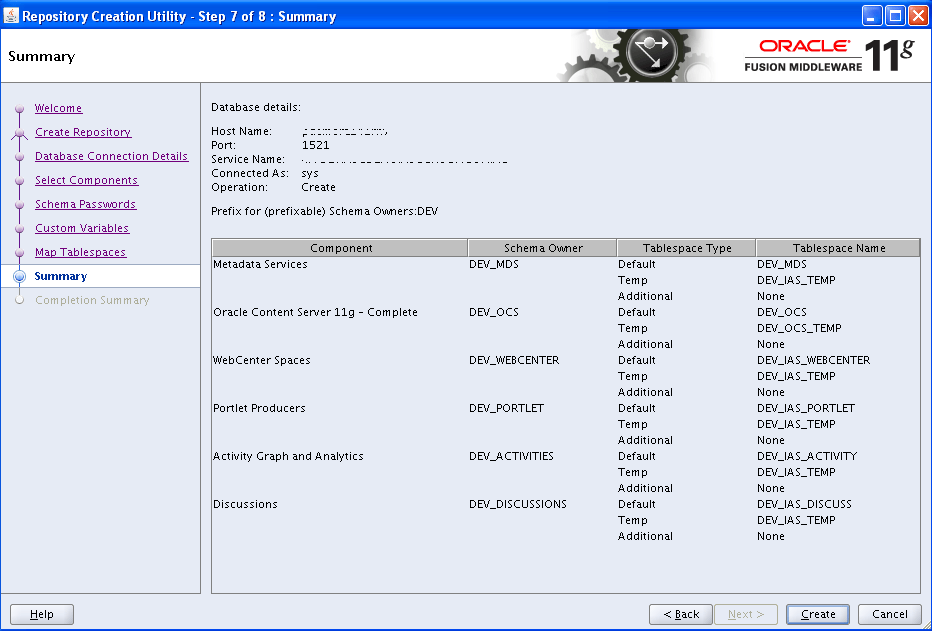
RCU – Screen 7

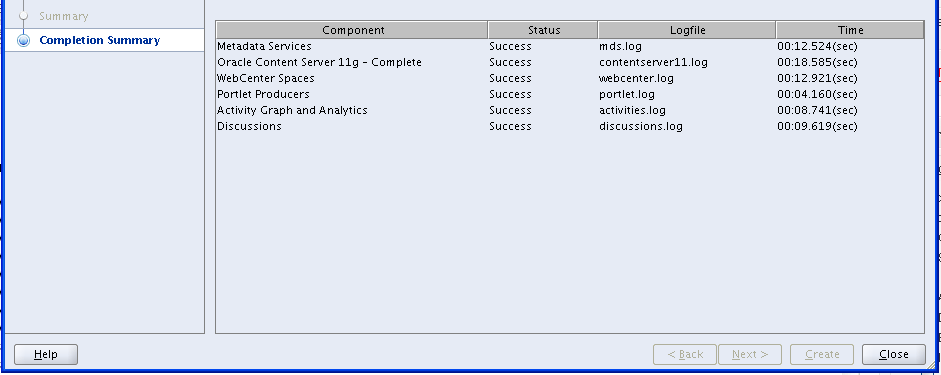
RCU – Screen 8
Completion Summary

Appendix – A: OEL Libraries for X11
[oracle@pdemora140rhv Packages]$ rpm -qa|grep -y x11
xorg-x11-drv-ati-firmware-6.13.0-6.el6.noarch
xorg-x11-server-common-1.7.7-26.el6.x86_64
xorg-x11-drv-void-1.3.0-4.el6.x86_64
xorg-x11-drv-intel-2.11.0-7.el6.x86_64
xorg-x11-drv-sis-0.10.2-1.1.el6.x86_64
xorg-x11-drv-s3virge-1.10.4-1.1.el6.x86_64
xorg-x11-drv-vmware-10.16.7-2.1.el6.x86_64
xorg-x11-drv-openchrome-0.2.904-1.el6.x86_64
xorg-x11-drv-mga-1.4.12-2.el6.x86_64
xorg-x11-drv-sisusb-0.9.3-1.1.el6.x86_64
xorg-x11-drv-penmount-1.4.0-5.el6.x86_64
xorg-x11-drv-ast-0.89.9-1.1.el6.x86_64
xorg-x11-drv-savage-2.3.1-1.1.el6.x86_64
ConsoleKit-x11-0.4.1-3.el6.x86_64
xorg-x11-xinit-1.0.9-13.el6.x86_64
xorg-x11-server-Xorg-1.7.7-26.el6.x86_64
xorg-x11-drv-synaptics-1.2.1-5.el6.x86_64
xorg-x11-drv-vmmouse-12.6.5-3.el6.x86_64
xorg-x11-drv-cirrus-1.3.2-1.1.el6.x86_64
xorg-x11-drv-siliconmotion-1.7.3-1.1.el6.x86_64
xorg-x11-drv-nv-2.1.15-4.el6.x86_64
xorg-x11-drv-mutouch-1.2.1-5.el6.x86_64
xorg-x11-drv-nouveau-0.0.16-8.20100423git13c1043.el6.x86_64
xorg-x11-drv-ati-6.13.0-6.el6.x86_64
xorg-x11-drv-mach64-6.8.2-1.1.el6.x86_64
xorg-x11-drv-keyboard-1.4.0-3.el6.x86_64
pulseaudio-module-x11-0.9.21-13.el6.x86_64
xorg-x11-utils-7.4-8.el6.x86_64
libX11-common-1.3-2.el6.noarch
xorg-x11-xkb-utils-7.4-6.el6.x86_64
xorg-x11-xauth-1.0.2-7.1.el6.x86_64
xorg-x11-drv-vesa-2.3.0-1.el6.x86_64
xorg-x11-drv-r128-6.8.1-2.el6.x86_64
xorg-x11-drv-trident-1.3.3-1.1.el6.x86_64
xorg-x11-drv-aiptek-1.3.0-2.el6.x86_64
xorg-x11-drv-tdfx-1.4.3-1.1.el6.x86_64
xorg-x11-drv-dummy-0.3.3-1.el6.x86_64
xorg-x11-drv-glint-1.2.4-1.1.el6.x86_64
xorg-x11-drv-elographics-1.2.3-5.el6.x86_64
xorg-x11-drv-fbdev-0.4.2-1.el6.x86_64
xorg-x11-drv-mouse-1.5.0-4.el6.x86_64
xorg-x11-drv-fpit-1.3.0-5.el6.x86_64
libX11-1.3-2.el6.x86_64
libX11-1.3-2.el6.i686
xorg-x11-drv-wacom-0.10.5-6.el6.x86_64
xorg-x11-drv-acecad-1.4.0-2.el6.x86_64
xorg-x11-drv-apm-1.2.2-1.1.el6.x86_64
xorg-x11-drv-hyperpen-1.3.0-4.el6.x86_64
xorg-x11-drv-i128-1.3.3-1.1.el6.x86_64
dbus-x11-1.2.24-3.el6.x86_64
xorg-x11-server-utils-7.4-15.el6.x86_64
xorg-x11-drivers-7.3-13.2.el6.x86_64
xorg-x11-drv-evdev-2.3.2-8.el6.x86_64
xorg-x11-drv-voodoo-1.2.3-1.1.el6.x86_64
xorg-x11-drv-qxl-0.0.12-2.1.el6.x86_64
xorg-x11-drv-v4l-0.2.0-3.el6.3.x86_64
xorg-x11-drv-rendition-4.2.2-4.1.el6.x86_64
xorg-x11-drv-i740-1.3.2-1.1.el6.x86_64




Hi there, which library would I choose from the DVD?
Thanks 🙂
Thanks a lot !!!!!! especially for handily the error senarios
Can you suggest me how to achive this:
1) Which RCU to use while installing on Solaris.
2)If i want to put the all manage server in a separate box.
Thanks a lot,it was indeed good.